
Monitor Your Weight Alternative: How Scaler Compares on iPhone and iPad
Monitor Your Weight is a feature-packed weight tracker with ads and paid sync. Here's how Scaler differs on privacy, design, backup, trend weight and hands-free logging — and who should stay with Monitor Your Weight.

Few weight trackers have been around as long as Monitor Your Weight. Built by an independent developer, it has collected more than 24,000 ratings on the US App Store with an average of 4.8 stars, plus a couple of awards along the way. Over the years it has grown into something close to a Swiss Army knife: multiple profiles, body measurements, ideal weight and calorie calculators, smart scale support, an Apple Watch app and more than 20 languages.
That breadth is exactly why some people start looking elsewhere. If you only want to step on the scale, note the number and see where you’re heading, a long list of options — and the ads that pay for them — can feel like more than you need. Scaler takes the opposite approach: a focused tracker with no ads, built around a clean iOS 27 design.
Full disclosure: we make Scaler. We’ve stuck to facts we could check, and we point out plainly where Monitor Your Weight is the stronger app.
Two Different Ideas of a Weight Tracker
Monitor Your Weight tries to cover every angle of body tracking in one place. You can follow your own weight and your partner’s, log waist and hip measurements, estimate body fat and daily calories, and connect a Garmin, Withings, Fitbit Aria or WiT scale. It is free with ads, and syncing between devices is a small extra purchase.
Scaler concentrates on weight alone and tries to make that one task as quick and pleasant as possible. There are no ads and no account, your history is backed up to iCloud for free, and you can log a weigh-in with your voice or the Action button. Deeper analytics and weight prediction are available in an optional Pro upgrade.
Neither approach is wrong. The question is which one fits the way you actually use a tracker.
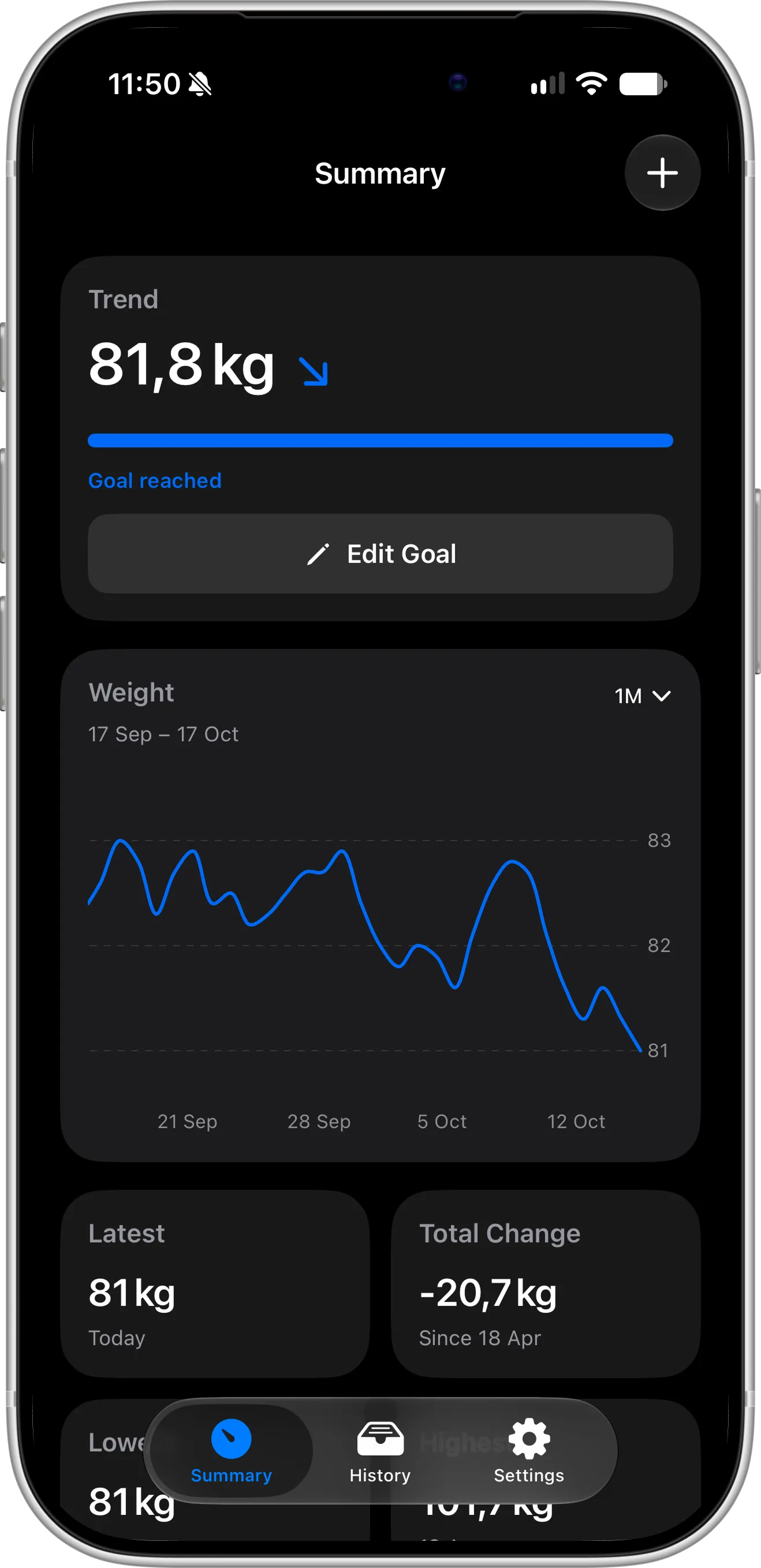
Side by Side
We checked both App Store listings and the Monitor Your Weight website in October 2026. Apps change, so treat this as a snapshot and confirm on the App Store before you decide.
| Monitor Your Weight | Scaler | |
|---|---|---|
| Cost | Free with ads; sync is a $0.99 in-app purchase | Free, no ads; optional Pro at $1.99/month, $11.99/year or $39.99 lifetime (US) |
| Ads | Yes | No |
| Sync and backup | Paid only, stored on the developer’s own server (no iCloud) | Automatic through your iCloud account, free |
| Account | Needed for sync | Never |
| Platforms | iPhone, Apple Watch, Apple silicon Mac, Vision Pro, Android | iPhone and iPad (native) |
| Minimum iOS | iOS 13 | iOS 18 |
| Languages | 23 | 8 |
| Multiple profiles | Yes | — |
| Body measurements | Yes | Weight only |
| BMI | Yes | Yes, with your healthy weight range |
| Ideal weight, calories, body fat estimates | Yes | — |
| Trend weight | Not listed | Yes, shown on the main screen |
| Weight prediction | No | Yes (Pro) |
| Weekly change and weight distribution charts | No; only average daily and weekly loss figures | 7- and 30-day change, weekly bar chart, weight distribution, weigh-in times (Pro) |
| Widgets | No; remaining weight can only show as an app icon badge | Lock Screen and Home Screen widgets (Lock Screen and 1 Home Screen design free, 2 more in Pro) |
| Siri, Spotlight, Shortcuts, Action button | No | Yes, free |
| Smart scales | Garmin, Withings, Fitbit Aria, WiT, plus Apple Health | Through Apple Health |
| Weigh-in reminders and streak | No reminder settings; no streak | Reminders and a daily check-in streak |
| PIN lock | Yes | No |
| Export | By email only | JSON file you can save anywhere, free |
| iOS 27 support | Runs, but with visual bugs | Fully redesigned for iOS 27 |
| Recent updates | Bug fixes and iOS compatibility | New features roughly every month |
Where Scaler Makes a Difference
No ads between you and your number
Monitor Your Weight is supported by advertising, and you notice it straight away. When we installed it for this review, a banner ad sat at the top of every screen, from the first launch onwards. Its App Store privacy label lists location, identifiers and usage data as “Data Used to Track You”, collected for third-party advertising. For many people that’s a fair trade for a free app; for others, a weight tracker is the last place they want ads or ad tracking.
Scaler shows no ads at all, asks for no account and never sells your data. Your weight entries stay on your device and in your own iCloud. We do use analytics and crash reporting to improve the app — the details are in our Privacy Policy — but nothing in Scaler exists to serve you advertising.
A design that matches the rest of your iPhone
Monitor Your Weight’s summer 2026 release made it run on iOS 26, but it didn’t redesign the app, and it hasn’t been fully adapted to iOS 27 yet. On iOS 27 we ran into plenty of visual glitches during testing, with elements that looked out of place next to the new system design. Using it day to day, the design still feels like it’s from a much older version of iOS. Screens are packed with fields and figures, and it isn’t always clear what a button will do until you tap it.
Here’s the main screen of Monitor Your Weight on our iPhone, running on iOS 27, right after we set up a profile:
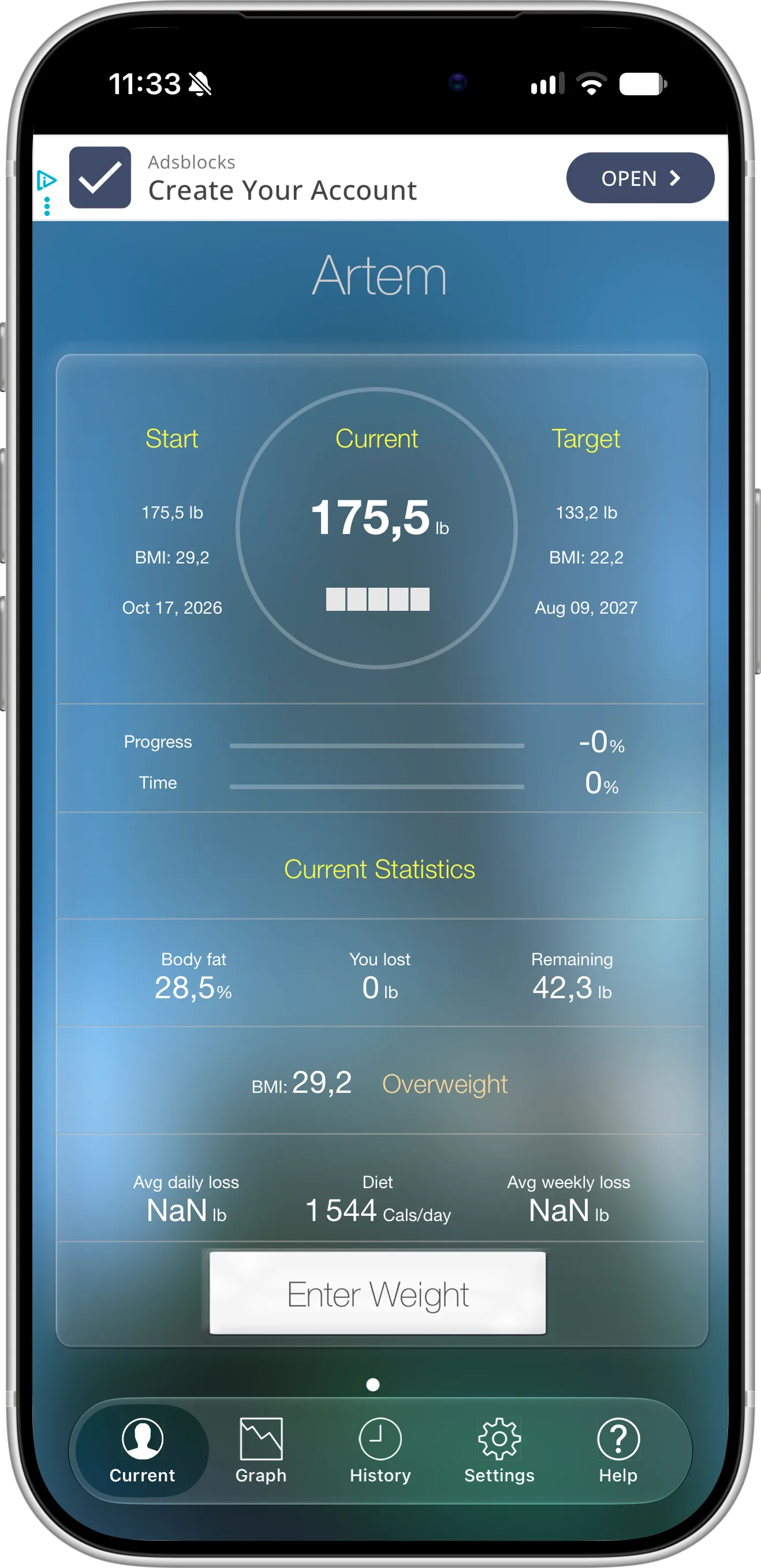
Monitor Your Weight, a separate app not made by Scaler. Screenshot taken on iOS 27 in October 2026.
There’s a lot to take in here: an ad banner across the top, more than a dozen numbers in small white and yellow text on a blue gradient background, and nothing that stands out as the one figure that matters. The average daily and weekly loss fields even read “NaN lb”, short for “not a number”, an error value the app shows instead of handling a profile with just one weigh-in.
Scaler was designed from scratch for iOS 27 and follows Apple’s current design guidelines, including dark mode. The main screen gives you your weight, trend and goal progress in one glance, and logging a new weigh-in takes a couple of taps.
Start tracking in seconds, not after a questionnaire
Before you can log a single weigh-in in Monitor Your Weight, you have to create a profile. When we tried it, the setup asked for 11 things: name, date of birth, height, gender, body frame, start weight, start date, target weight, target date, lifestyle and a theme colour. Much of this feeds its ideal weight and calorie calculators, which is useful if you want those numbers. But if you just want to know your weight this week, it’s a lot of form-filling up front.
Scaler lets you skip straight to your first weigh-in. Even a goal is optional: you can set one later, once you know where you want to go, and the same goes for adding your height to see your BMI. Nothing stands between installing the app and logging your weight.
Backup that stays in your own iCloud
Monitor Your Weight doesn’t use iCloud. The only way to sync or back up your history is to buy the Synchronization option, and your entries then go to a server run by the app’s developer. Without the purchase, your data lives only on your phone. To be fair, $0.99 is a reasonable price for what you get, and it adds handy extras like viewing your data in a browser or sharing it with a coach. It’s still an extra account, and your body weight history ends up on a third-party server instead of in your own Apple account. That’s a privacy trade-off worth thinking about for such personal data.
In Scaler, iCloud sync and backup are part of the free app. There’s nothing to buy, no sign-up and no third-party server: your entries live in your own iCloud account and reappear automatically on a new iPhone or on your iPad.
The same goes for getting your data out. Monitor Your Weight only exports by email, so there’s no way to simply save a file to your iPhone or iCloud Drive. Scaler exports your full history as a JSON file that you can save to Files, AirDrop to your Mac or keep wherever you like, for free.
Weigh in by voice or with one button
Step off the scale and say “Hey Siri, please log my weight in Scaler”, then tell it the number. You can also type it into Spotlight, run it from a Shortcuts automation or press the Action button. Scaler records the entry without you ever opening the app, and this works on the free plan. Monitor Your Weight has no Siri or Shortcuts support, so every weigh-in means opening the app, waiting past the ad and typing the number, unless it comes from a connected scale.
Setting up the Action button takes a few seconds: open Settings → Action Button, swipe to Shortcut and pick Scaler’s Log Weight action. From then on, a single press opens a quick entry field for your weight.
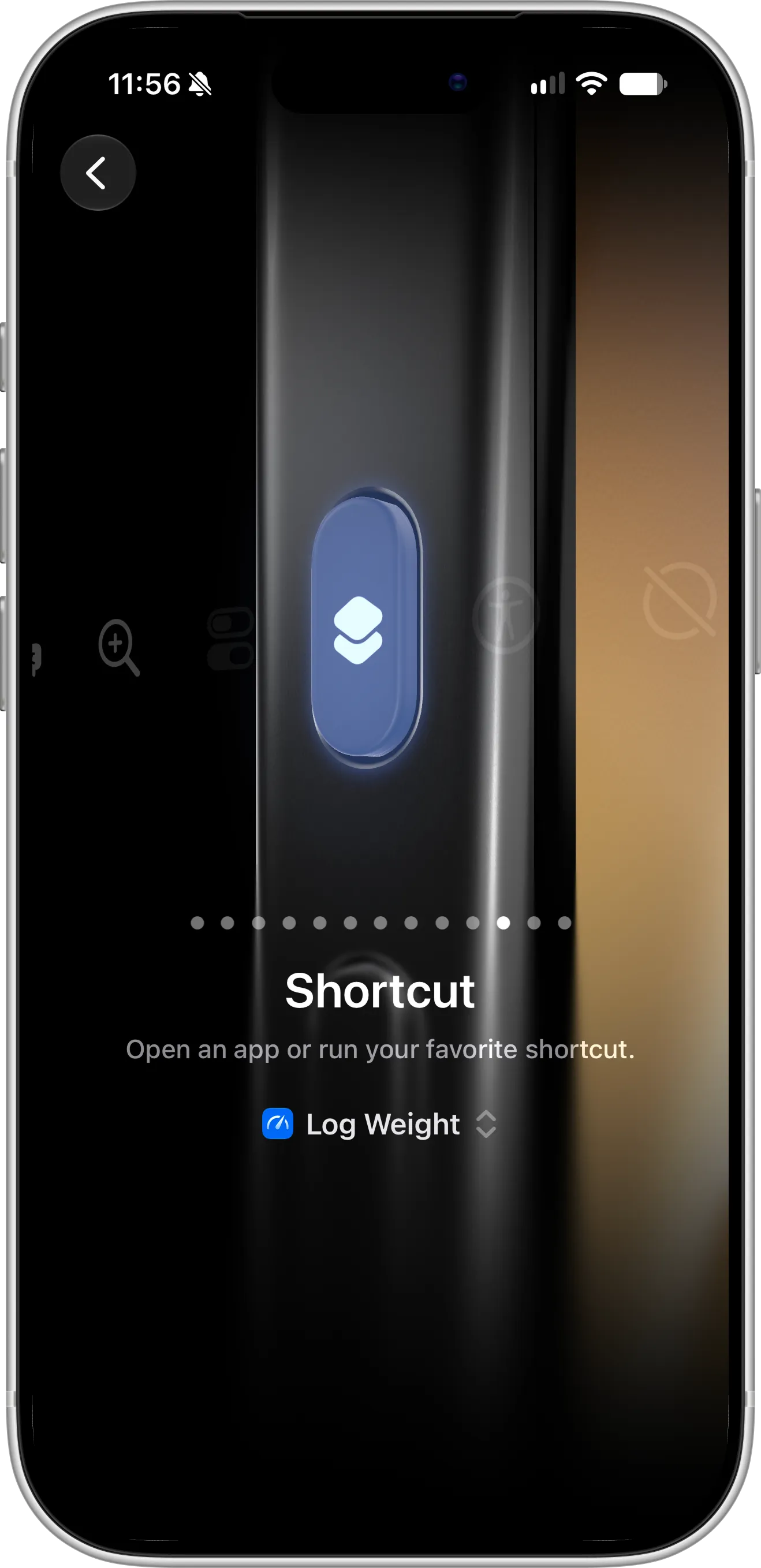
A calmer way to read your progress
Day-to-day weight bounces around with water, salt and sleep. Monitor Your Weight answers that with lots of statistics: total lost, weight remaining, average daily and weekly loss and an overall progress figure. In practice, we found them hard to read. The numbers are set in a small font with nothing to draw your eye to what matters, so it takes effort to work out how you’re actually doing. It also has no weight prediction, no chart of week-by-week changes and no view of how your weight is distributed over time.
Scaler instead puts a single trend weight at the top of the screen. It smooths out daily fluctuations automatically, so a salty dinner doesn’t look like a setback and one lucky morning doesn’t look like a breakthrough. With Pro, you also get a weight prediction based on your recent entries and an analytics screen with your 7- and 30-day change, a weekly gain-and-loss chart, how long you’ve spent at each weight and what time of day you usually weigh in.
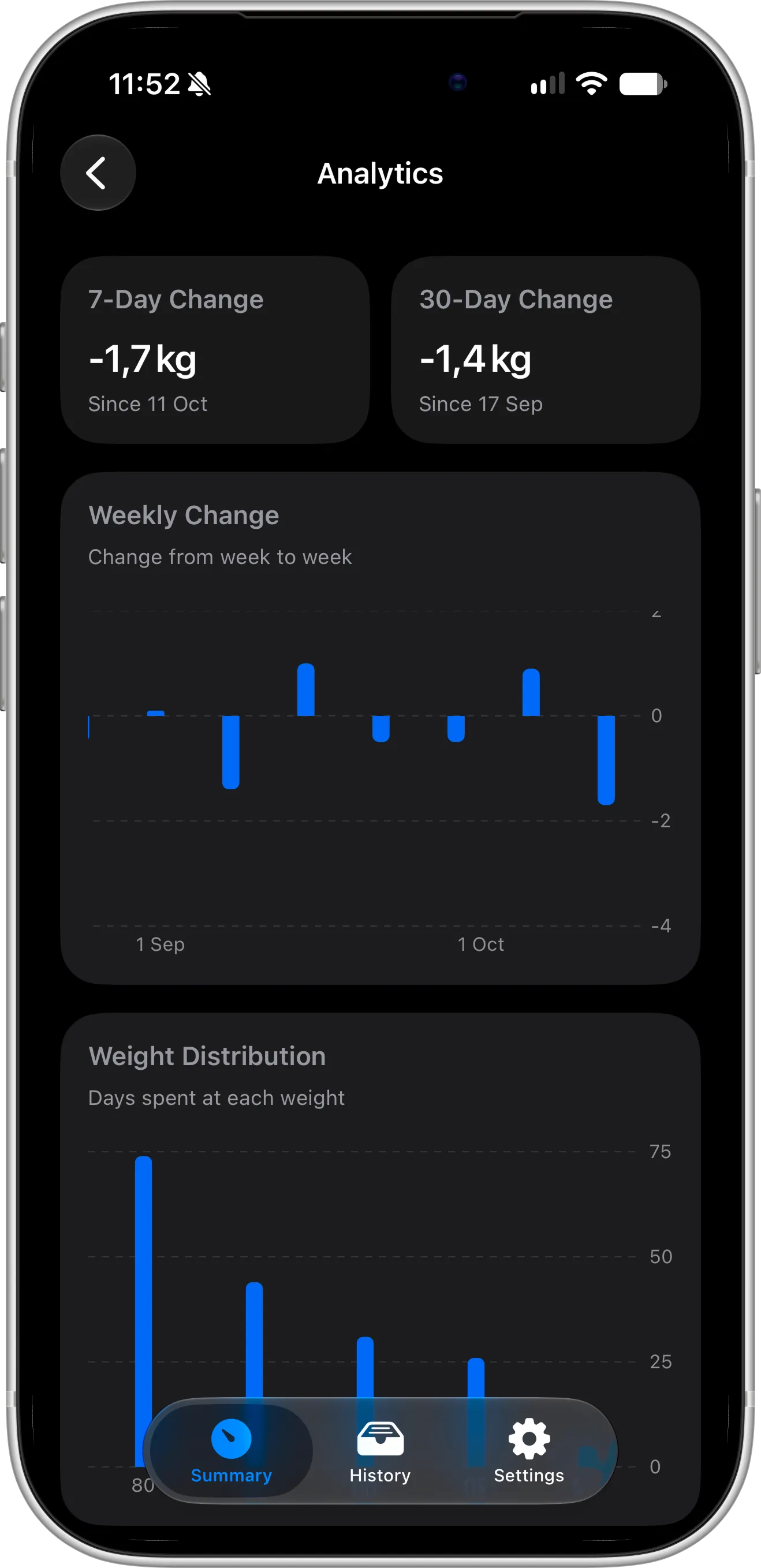
Your progress at a glance, outside the app
Monitor Your Weight has no Home Screen or Lock Screen widgets. The closest it gets is a badge on its app icon showing how much weight you have left to lose. Scaler has proper Lock Screen and Home Screen widgets that show your current weight and progress. Lock Screen widgets and one Home Screen design are free; Pro adds two more designs. See our guides to Lock Screen widgets and Home Screen widgets.
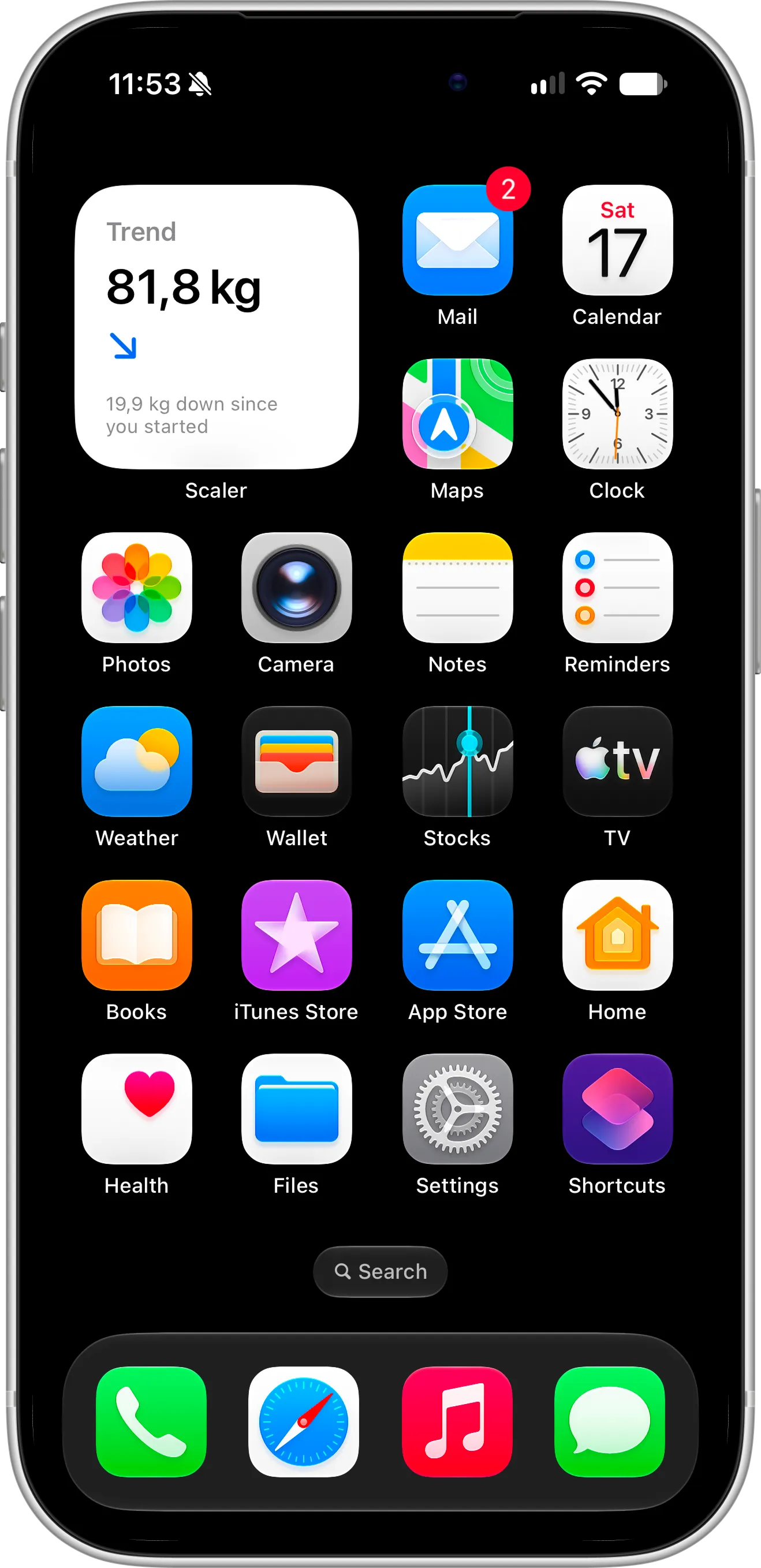
Here’s the small Home Screen widget in action: your trend weight, which way it’s heading and how much you’ve lost since you started, visible every time you unlock your phone.
Built for iPad, not just allowed on it
Monitor Your Weight’s App Store listing says “Designed for iPhone”, so on an iPad it runs as an enlarged iPhone app. Scaler has a native iPad layout and keeps both devices in sync through iCloud.
Small nudges that build a habit
Monitor Your Weight asks for permission to send notifications, but that’s where it ends. We couldn’t find any setting to schedule a weigh-in reminder or choose when you hear from the app, and neither its App Store listing nor its website mentions reminders. In practice, keeping the habit is up to you.
Scaler lets you set a weigh-in reminder and keeps a daily check-in streak. Consistent weigh-ins at a similar time of day are what make a trend trustworthy, and a growing streak is a gentle reason not to skip tomorrow.
Shaped by the people who use it
Look through Monitor Your Weight’s version history and you’ll see a long run of releases labelled simply “Bug Fixes”. In recent years its updates have kept it working on new versions of iOS and fixed smart scale connections, but they haven’t added new features.
Scaler launched in July 2026 and has shipped something new nearly every month since — widgets, weight prediction, advanced analytics, the iOS 27 redesign and hands-free logging. Every release is listed in the changelog, and many features came straight from user suggestions. If something is missing for you, send us your idea.
Who Should Stay With Monitor Your Weight
Monitor Your Weight covers ground Scaler deliberately doesn’t. It’s likely the better fit if:
- You track more than one person. Separate profiles for family members are built in. Scaler is designed for one person per Apple ID.
- You want tape-measure numbers too. Monitor Your Weight records body measurements and estimates body fat, ideal weight and daily calories. Scaler tracks weight and BMI.
- Your smart scale should connect directly. It talks to Garmin, Withings, Fitbit Aria and WiT scales. Scaler reads scale data only through Apple Health.
- You wear an Apple Watch or use Android. Monitor Your Weight has a Watch app and an Android version. Scaler is iPhone and iPad only.
- You need your coach or doctor to see your data. Its web access lets a professional view your entries online.
- You want a PIN on your weight log. Monitor Your Weight can lock the app behind a PIN code. Scaler has no app lock of its own.
- You’re on an older device. It supports iOS 13, while Scaler needs iOS 18.
- You prefer your own language. With 23 languages, it covers far more than Scaler’s 8.
The Verdict
Stay with Monitor Your Weight if you want an all-in-one body tracker for several people, with measurements, calculators, direct smart scale support and an Apple Watch app, and you don’t mind ads.
Try Scaler if you want a modern, ad-free app that does weight tracking really well: free iCloud backup with no account, a smoothed trend weight, widgets and logging with Siri or the Action button, on both iPhone and iPad.
Both are free to download, so the easiest test is to use them side by side for a week.
Switching From Monitor Your Weight
- In Monitor Your Weight, turn on Apple Health so your weight history is written to the Health app, and email yourself an export as a backup copy.
- Install Scaler and allow Apple Health access when it asks.
- Choose kilograms, pounds or stones, add your height for BMI and set a goal to lose or gain weight.
- Add a Lock Screen or Home Screen widget and set a weigh-in reminder.
- Set up Siri or the Action button so tomorrow’s weigh-in takes seconds.
If you track several people in Monitor Your Weight, only move your own profile — each person can use Scaler with their own Apple ID.
FAQ
Does Monitor Your Weight have ads?
Yes. The app is free and supported by advertising, and its App Store privacy label lists data used for third-party advertising. Scaler has no ads.
Is sync free in Monitor Your Weight?
No. Syncing and server backup are unlocked with a $0.99 in-app purchase and use the developer’s server. Scaler syncs and backs up to your own iCloud account for free.
Does Monitor Your Weight have widgets or Siri support?
No. It has no Home Screen or Lock Screen widgets and doesn’t work with Siri or Shortcuts. It can show your remaining weight as a badge on its app icon. Scaler offers widgets and Siri, Spotlight, Shortcuts and Action button logging, and the logging is free.
Can I track my whole family in Scaler?
Not in one app profile. Scaler tracks one person per Apple ID, so each family member would use Scaler on their own device. If you want several profiles on one phone, Monitor Your Weight supports that.
Does Scaler connect to my smart scale?
Not directly. If your scale’s app saves weight to Apple Health, Scaler can read it from there.
What does Scaler Pro include?
Advanced analytics, weight prediction and two additional Home Screen widget designs. It costs $1.99 per month, $11.99 per year or $39.99 once in the US. Everything else — logging, goals, trend weight, BMI, charts, reminders, streaks, Siri and Action button logging, Lock Screen widgets, one Home Screen widget, iCloud sync and JSON export — is free.
Is Scaler on Apple Watch or Android?
No. Scaler runs natively on iPhone and iPad.
Can I import my Monitor Your Weight history?
Scaler doesn’t import files, but it reads your weight history from Apple Health. Let Monitor Your Weight write to Health first, then grant Scaler access.
Final Word
Monitor Your Weight has earned its reputation by doing a lot, for a lot of people, for a long time. If you’ve realised you mostly use it to log your weight and check your progress, Scaler offers that core experience without ads, without an account and with free iCloud backup. Download Scaler for free and see if it fits your routine.