
Weigh In vs Scaler: Which Simple iPhone Weight Loss Tracker Is Right for You?
Weigh In and Scaler are both minimal weight trackers for iPhone. We compare them feature by feature — sync, widgets, BMI, hands-free logging and price — and say plainly where Weigh In is the better fit.

Weigh In: Weight Tracker has been on the App Store since 2016 and describes itself, fittingly, as “the simple weight tracker”. It is built by an independent developer, it is completely free, and it does one job: you type in your weight, it draws a graph and shows how far you are from your target. With a 4.7-star rating, plenty of people are happy with exactly that.
So why look for an alternative? Usually for one of a few reasons: you want your history safely backed up, you also use an iPad, or you would like a little more insight than a single line on a graph — without the app becoming complicated. That’s the space Scaler is designed for.
A quick disclaimer: Scaler is our app. We have tried to keep this comparison factual, and there is a whole section below on why you might prefer to stick with Weigh In.
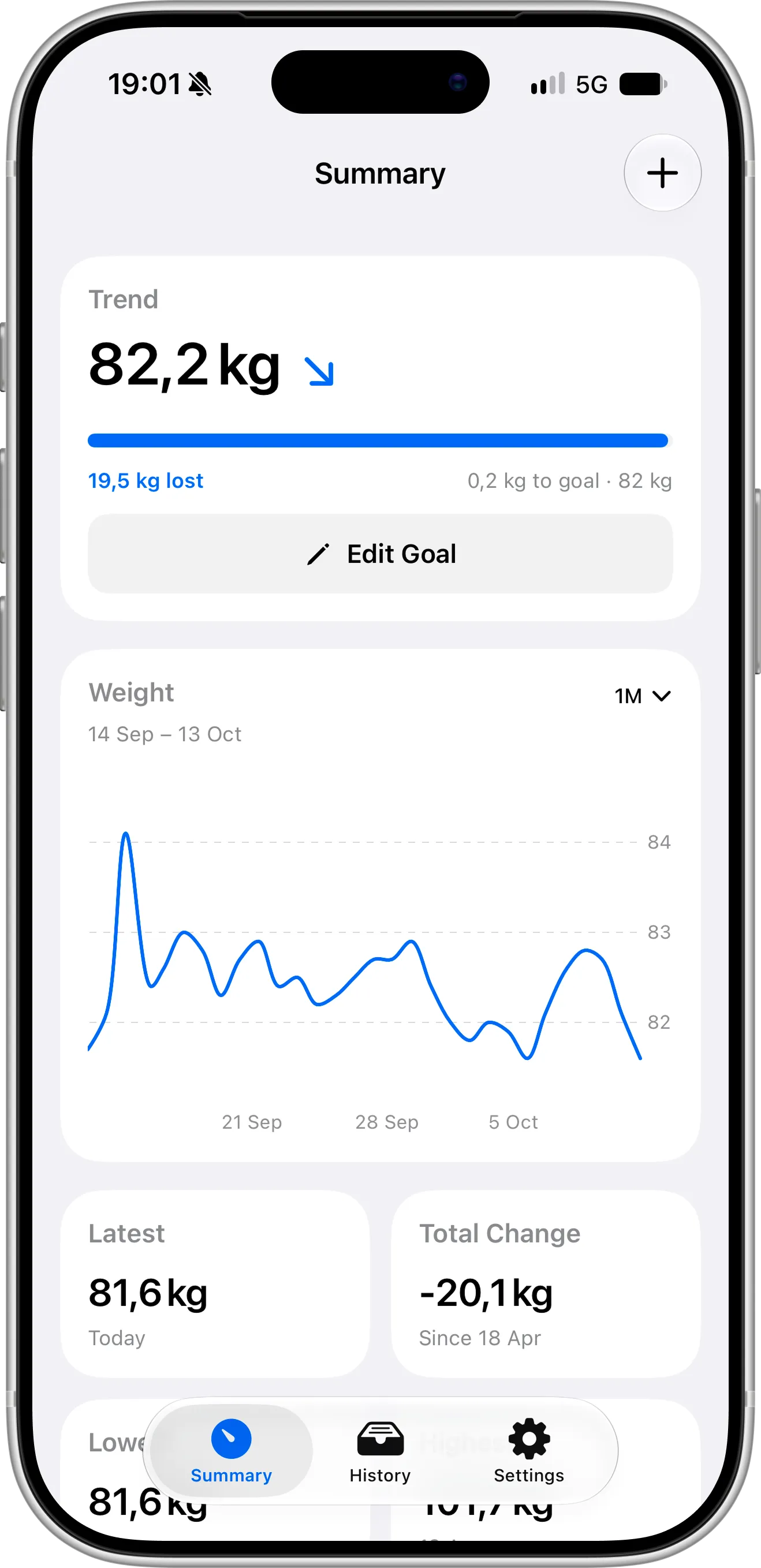
The Short Version
Both apps share the same philosophy: logging your weight should take seconds, and the app shouldn’t get in your way. The difference is in scope.
- Weigh In is a lean, single-purpose logger for iPhone. It’s 100% free, stores everything locally and keeps the feature set intentionally small.
- Scaler keeps the same simplicity in a modern, intuitive design built for iOS 27, and adds the things that make a tracker easier to live with every day: iCloud sync and backup, iPad support, widgets, a free BMI calculator, a smoothed trend weight and hands-free logging with Siri and the Action button. An optional Pro upgrade adds deeper analytics and weight prediction.
Feature Comparison
Details below come from each app’s App Store listing and official website, checked in October 2026. Features change over time, so please confirm on the App Store.
| Weigh In | Scaler | |
|---|---|---|
| Price | Free, no in-app purchases | Free; optional Pro at $1.99/month, $11.99/year or $39.99 lifetime (US) |
| Devices | iPhone only | iPhone and iPad |
| Languages | English | 8 languages, including English, Spanish, French, German and Japanese |
| Requires | iOS 17 or later | iOS 18 or later |
| Design | Simple, older-style interface | Modern, intuitive design following iOS 27 guidelines |
| Target weight | Yes | Yes, for losing or gaining weight |
| Graphs | Customizable graph with start, target and average lines | Progress charts and trend weight |
| Advanced analytics | — | Yes (Pro) |
| Trend weight | — | Yes, calculated automatically |
| BMI and healthy weight range | — | Yes (free) |
| Weight prediction | — | Yes (Pro) |
| Home Screen and Lock Screen widgets | — | Yes (Lock Screen and 1 Home Screen design free, 2 more in Pro) |
| Siri, Spotlight, Shortcuts and Action button logging | — | Yes (free) |
| Weigh-in reminders | Yes, with follow-up reminders | Yes |
| Daily check-in streak | — | Yes |
| Apple Health | Writes weight and shows data from other apps | Sync |
| iCloud sync and backup | — | Yes, automatic |
| Import | CSV | Apple Health |
| Export | CSV | JSON (free) |
| Account required | No | No |
What Scaler Adds
A fresh design that feels at home on iOS 27
Open the two apps one after the other and the difference is obvious. Weigh In has kept much the same look for years: it’s still clean and easy to use, but its screens feel like they come from an earlier generation of iOS.
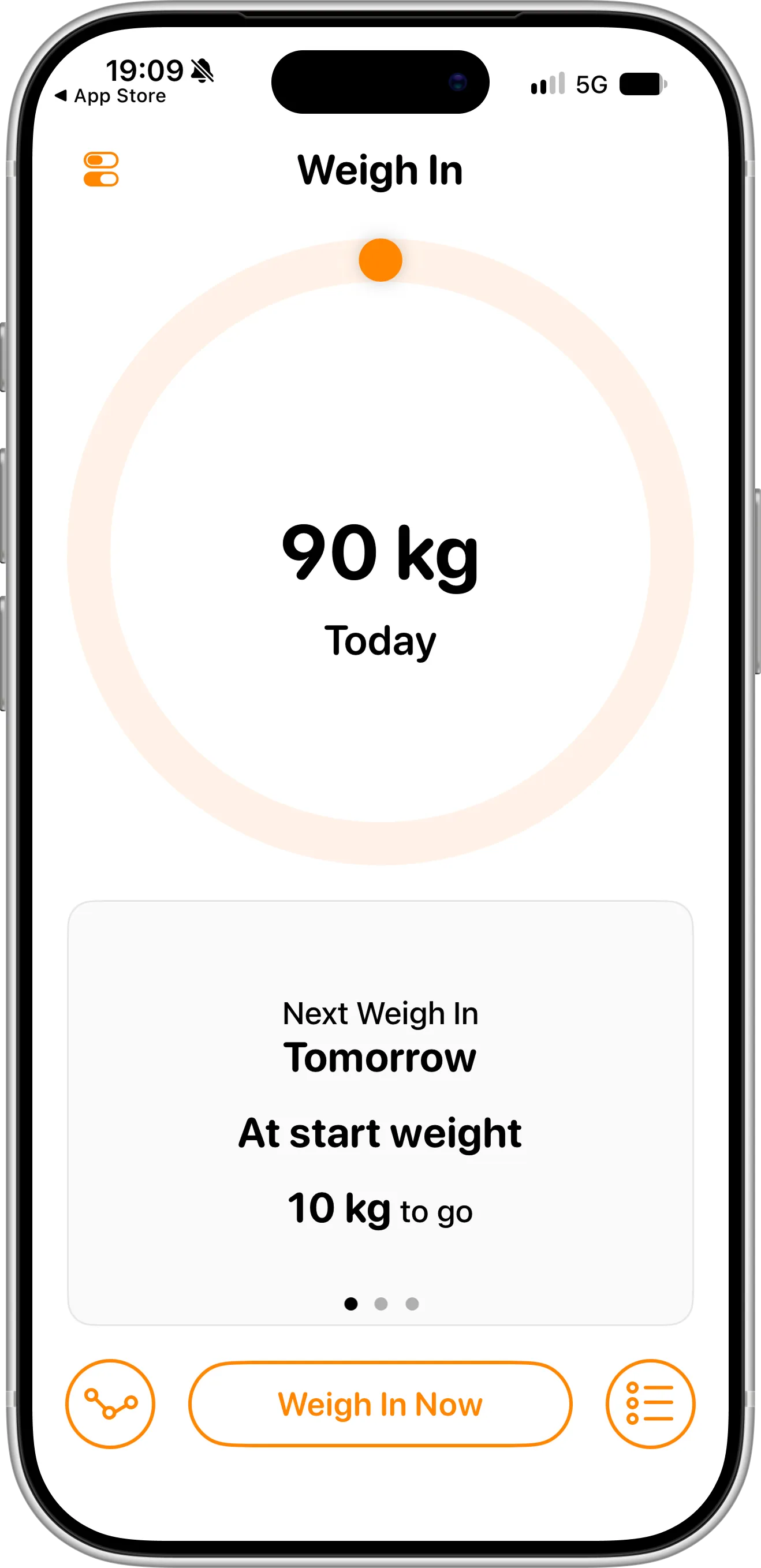
Scaler was designed from the ground up for the latest version of Apple’s platform and follows the iOS 27 design guidelines. Its layouts, controls, transitions and dark mode match the apps that come with your iPhone, so everything is where you expect it to be. Your weight, your progress and your chart are clear at a glance, and adding a new entry takes a couple of familiar taps — simple like Weigh In, just more modern and more intuitive.
Your history is backed up and follows you
This is the most practical difference. Weigh In keeps your entries only on your iPhone, with no iCloud sync or backup. Your weight history depends on that single device — or on remembering to export a CSV file now and then.
Scaler saves your entries to your own iCloud account automatically. There is nothing to enable and no account to create. Replace or lose your iPhone, sign in with the same Apple ID, and years of weigh-ins come back on their own.
iPhone and iPad, kept in sync
Weigh In is listed as an iPhone app. Scaler runs natively on both iPhone and iPad, and every entry you add on one appears on the other through iCloud. If you like reviewing your progress on a bigger screen, or your iPad is the device that lives in the bathroom next to the scale, that matters.
See the trend, not just the noise
Daily weight jumps around by a kilo or two for reasons that have nothing to do with fat — water, salt, a late dinner. A plain graph of raw weigh-ins makes those swings look like real progress or real setbacks.
Scaler calculates a trend weight that smooths out day-to-day fluctuations and shows it right at the top of the main screen. You get one calm number that tells you which direction you are really heading, without picking an averaging method or touching any settings.
Log a weigh-in without opening the app
In Scaler you can record your weight with Siri, from Spotlight search, inside a Shortcuts automation or with a press of the Action button on your iPhone. Step off the scale, say the number, done. This is free for everyone, and it removes the small bit of friction that makes people skip a morning — and then a week. Weigh In has no Siri, Spotlight or Shortcuts support, so every weigh-in is entered by hand inside the app.
Progress on your Home Screen and Lock Screen
Scaler’s widgets put your current weight and progress where you’ll see them dozens of times a day — something Weigh In doesn’t offer, since it has no widgets. Lock Screen widgets and one Home Screen design are free, and Pro unlocks two additional Home Screen designs. We have step-by-step guides for Lock Screen widgets and Home Screen widgets.
Know where you stand — and where you’re heading
Enter your height once, and Scaler shows your BMI next to your weight along with the healthy weight range for your height. Weigh In doesn’t calculate BMI; in Scaler it’s included for free, so there’s no need to work it out in a separate app or website.
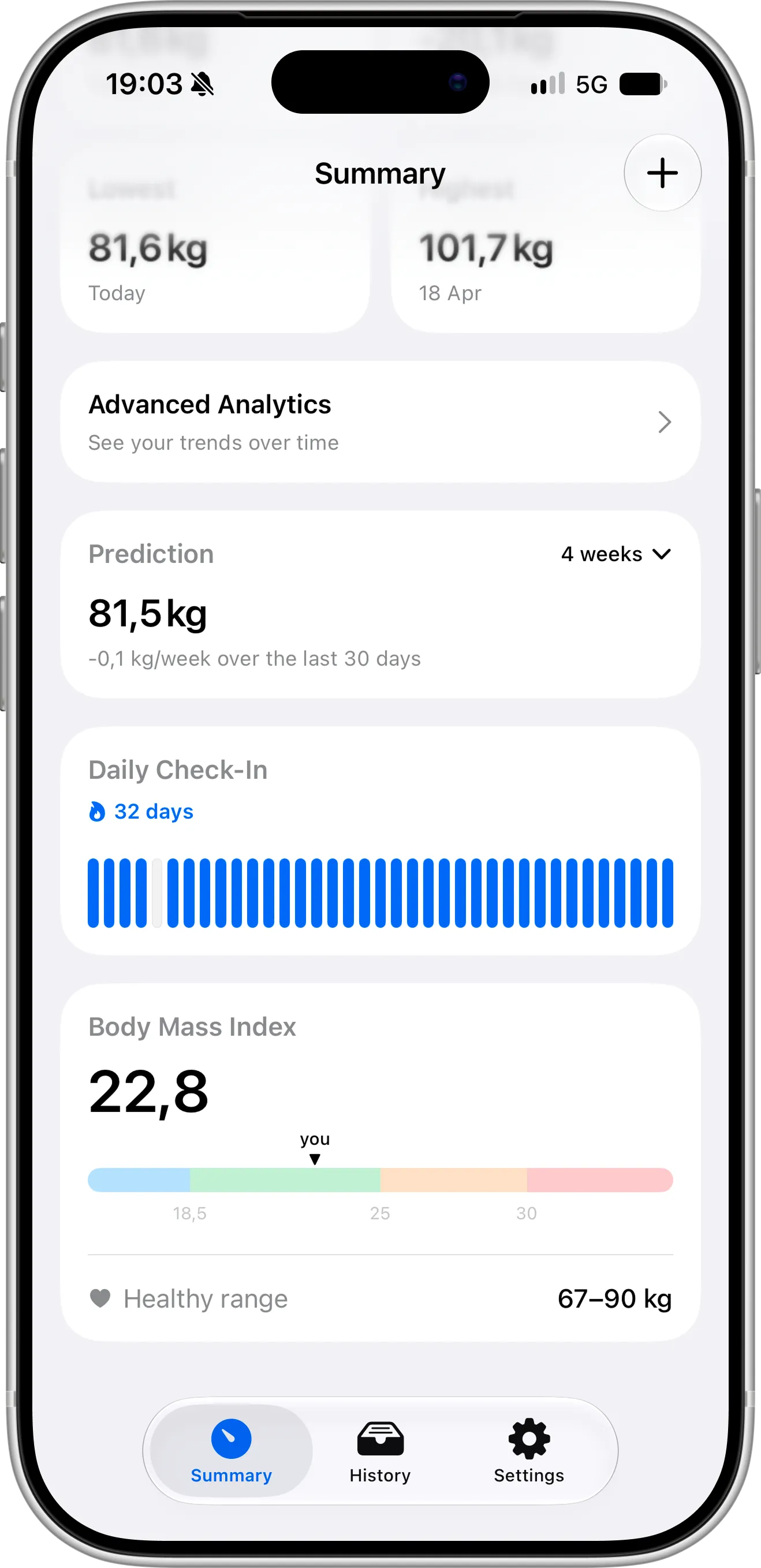
Scaler Pro also looks forward, not just back. Its weight prediction uses your recent entries to estimate where your weight is heading, so you can see early whether you’re on track for your goal — a feature Weigh In doesn’t have.
Answers, not just a line
Weigh In’s graph tells you where your weight has been, and that’s where its insights stop — it has no analytics beyond the graph. Scaler Pro goes a step further with an analytics screen that breaks your progress down: your change over the last 7 and 30 days, a bar chart of week-by-week gains and losses, how many days you have spent at each weight, and what time of day you usually weigh in.
None of this is required to use Scaler — the free version is a complete tracker — but it’s there when you start asking “why did last month stall?”
A gentle push to stay consistent
Alongside reminders, Scaler keeps a daily check-in streak, which Weigh In doesn’t have. It’s a small thing, but watching a streak grow is a surprisingly effective reason to step on the scale tomorrow morning too — and regular weigh-ins at a similar time are what make any trend reliable.
An app that keeps growing — with your ideas
Weigh In’s recent updates have mostly been about maintenance: bug fixes, stability improvements and compatibility with new iOS versions. The last notable addition was a CSV importer in late 2025, and iCloud sync, which has been promised on its website, still hasn’t arrived.
Scaler is under active development, with new features arriving roughly every month. Since its launch in July 2026, it has gained widgets, weight prediction, the advanced analytics screen, a full iOS 27 redesign and hands-free logging with Siri and the Action button — you can follow every release in the changelog.
Many of these features started as suggestions from people using the app. Our team reads every message, and if you have an idea that would make tracking your weight easier, tell us — good suggestions can land in Scaler within a few updates.
When Weigh In Is the Better Choice
Weigh In does several things well, and for some people it will remain the right app:
- You want everything free, forever. Weigh In has no in-app purchases at all. Most of Scaler is free too, but analytics, weight prediction and extra widget designs are part of Pro.
- You want an app that collects nothing. Weigh In’s App Store privacy label reads “Data Not Collected”. Scaler has no ads, no account and never sells data, and your weight entries stay on your device and in your iCloud — but it does use analytics and crash reporting tools, as listed in our Privacy Policy.
- You’re importing a CSV. Weigh In can import your weight history from a CSV file. Scaler doesn’t have a file importer; bringing older data in works through Apple Health.
- You like to personalize the look. Weigh In offers several colour themes in light and dark mode plus alternate app icons. Scaler follows the standard iOS look.
- You’re on an older iPhone. Weigh In supports iOS 17, while Scaler requires iOS 18 or later.
Bottom Line
Keep Weigh In if you want the most minimal free logger possible, you only use an iPhone, and you’re comfortable managing your own CSV backups.
Switch to Scaler if you want the same quick, uncluttered experience in a modern iOS 27 design, plus automatic iCloud backup, iPad support, a smoothed trend weight, widgets, free BMI and the ability to log your weight with Siri or the Action button — in an app that gets new features every month.
Both apps cost nothing to install, so try them side by side for a week and see which one you reach for.
Moving Your Data From Weigh In to Scaler
Weigh In writes your weigh-ins to Apple Health, which is the easiest bridge between the two apps:
- In Weigh In, make sure Apple Health access is turned on so your history is saved to the Health app.
- Download Scaler and allow access to Apple Health when asked.
- Pick your units (kg, lb or st), enter your height and set your goal weight.
- Set a reminder for the time you usually weigh in, and add a widget to your Lock Screen or Home Screen.
- Optionally, set up logging with Siri or the Action button so future weigh-ins take a few seconds.
As a safety net, export a CSV from Weigh In before you switch so you have your own copy of your history.
Frequently Asked Questions
Is Weigh In: Weight Tracker free?
Yes. Weigh In is free to download and the App Store listing shows no in-app purchases.
Does Weigh In back up my data to iCloud?
No. Weigh In doesn’t have iCloud sync or backup, so the only way to protect your history is to export a CSV file yourself. Scaler syncs and backs up your entries to iCloud automatically.
Does Weigh In work on iPad?
Weigh In is listed as an iPhone app. Scaler works on both iPhone and iPad and keeps them in sync through iCloud.
Is Scaler free?
Scaler is free to download, with no ads and no account. The free version includes weight logging, goals, trend weight, BMI, charts, reminders, a check-in streak, hands-free logging with Siri, Spotlight, Shortcuts and the Action button, Lock Screen widgets, a Home Screen widget, iCloud sync and JSON export. Scaler Pro adds advanced analytics, weight prediction and two more Home Screen widget designs for $1.99 per month, $11.99 per year or $39.99 once (US prices).
Can I import my Weigh In CSV file into Scaler?
Scaler doesn’t import CSV files. Instead, let Weigh In save your weight to Apple Health and give Scaler access to Apple Health.
Can Scaler track weight gain as well as weight loss?
Yes. When setting your goal you can choose to lose or gain weight.
Which units does Scaler support?
Kilograms, pounds and stones.
Is Weigh In still being updated?
Weigh In still receives occasional updates, but recent versions have focused on bug fixes and iOS compatibility rather than new features, and the promised iCloud sync hasn’t shipped yet. Scaler adds new features roughly every month, and the team welcomes suggestions through the contact page.
Is Scaler available on Android?
No. Scaler is a native app for iPhone and iPad only.
Final Thoughts
Weigh In proves that a weight tracker doesn’t need to be complicated, and we agree with that idea completely. Scaler is built on the same principle — it simply adds the everyday conveniences that a minimal logger leaves out. If backups, iPad, widgets or Siri logging are on your wish list, give Scaler a try. It’s free to start.