
Looking for a Happy Scale Alternative? An Honest Comparison With Scaler
Happy Scale is one of the best-rated weight trackers on iPhone. Here is an honest look at how Scaler compares — what you get for free, where Scaler does more, and where Happy Scale is still the better pick.

With a 4.9-star rating from more than 58,000 ratings and over a decade on the App Store, Happy Scale is one of the most trusted weight trackers on iPhone. Its big idea is a good one: instead of reacting to every daily weigh-in, it shows you a smoothed trend, so a salty dinner or a glass of water doesn’t feel like a setback. If you’re reading this, though, you are probably wondering whether you need to pay to get the most out of it — or whether a simpler app would do.
Scaler is a weight loss tracker for iPhone built around quick weigh-ins, clear charts and progress you can see at a glance. We make Scaler, so we are obviously not neutral — but we will try to be fair. Below is a side-by-side comparison, including the cases where Happy Scale is still the better choice.
Happy Scale vs Scaler at a Glance
Information below is based on each app’s App Store listing, website and release notes as of October 2026. Both apps update often, so check the App Store for the latest details.
| Happy Scale | Scaler | |
|---|---|---|
| Platforms | iPhone, iPad | iPhone, iPad |
| Free to download | Yes | Yes |
| Paid upgrade (US) | Deluxe: $1.99/month, $11.99/year or $39.99 lifetime | Pro: $1.99/month, $11.99/year or $39.99 lifetime |
| Weight prediction | Yes (Deluxe) | Yes (Pro) |
| Goal type | Lose or gain weight, with milestone goals | Lose or gain weight |
| BMI | Deluxe only (WHO and NHS modes) | Free for everyone, with your healthy weight range |
| Advanced analytics | Weight and trend charts, weekly loss rate | 7-day and 30-day change, plus weekly change, weight distribution and weigh-in time distribution charts (Pro) |
| Units | kg, lb, st | kg, lb, st |
| Home Screen widgets | Yes | Yes (1 free design, 2 more in Pro) |
| Lock Screen widgets | Yes | Yes |
| Weigh-in reminders | Yes | Yes |
| Daily check-in streak | — | Yes |
| Apple Health | Sync | Sync |
| Sync between devices | iPhone and iPad, via Dropbox | iPhone and iPad, automatic via iCloud (all users) |
| Data export | CSV file | Full history as JSON (always free) |
| Multiple profiles | Yes | No |
| Account required | No | No |
Where Scaler Goes Further
Simple, intuitive design
This is the biggest difference you’ll notice when you open both apps. Happy Scale is built for people who love data: it packs in many charts, statistics and settings for how your progress is calculated and displayed. That depth is powerful, but it can take time to learn what everything means and how to set it up.
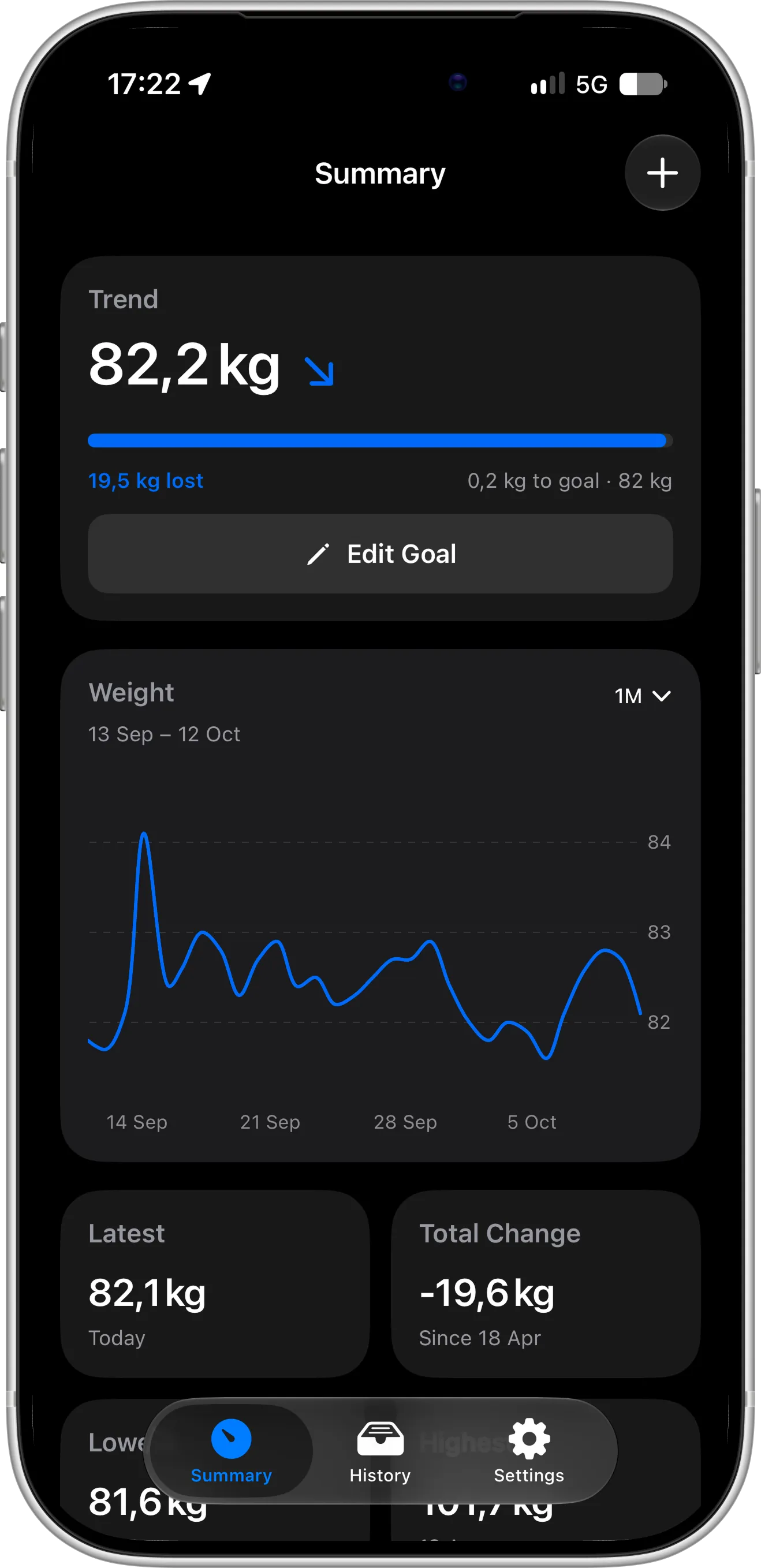
Scaler takes the opposite approach. It shows what matters most — your current weight, your progress toward your goal and a clear chart of how your weight is changing — on a single, uncluttered screen. There is nothing to configure before it becomes useful, so you can focus on understanding your weight journey instead of the app.
Modern iOS 27 design
Scaler is a native iOS app designed around Apple’s latest design language and fully adapted for iOS 27. Navigation, controls, animations and dark mode look and behave exactly like Apple’s own apps, so Scaler feels like a natural part of your iPhone and iPad rather than a separate app with its own rules. Logging a weigh-in or checking your progress takes a few familiar taps, with nothing new to learn.
More of the app is free
Here is the surprising part: the two apps cost exactly the same. Happy Scale Deluxe and Scaler Pro are both $1.99 per month, $11.99 per year or $39.99 for a one-time Lifetime purchase on the US App Store. The difference is in what you get without paying.
In Happy Scale, predictions are part of the paid upgrade, and the BMI calculator requires the Deluxe+ plan. In Scaler, goal tracking, BMI, progress charts, weigh-in reminders, Lock Screen widgets, a Home Screen widget, iCloud sync and data export are all free. Pro adds weight prediction, the advanced analytics screen and two extra Home Screen widget designs. If you never upgrade, Scaler still gives you a complete weight tracker.
Automatic iCloud sync and backup for everyone
Happy Scale stores your data on the device by default and syncs between iPhone and iPad through Dropbox. Scaler syncs your weight entries automatically between your iPhone and iPad through your own iCloud account and backs them up — no Dropbox account to connect and nothing to set up. Getting a new iPhone? Your weight history is simply there.
A routine that sticks
Scaler keeps a daily check-in streak, and together with weigh-in reminders it turns stepping on the scale into a habit rather than something you remember once a week. Consistent weigh-ins at the same time of day are also what make any weight trend meaningful.
See your weekly progress clearly
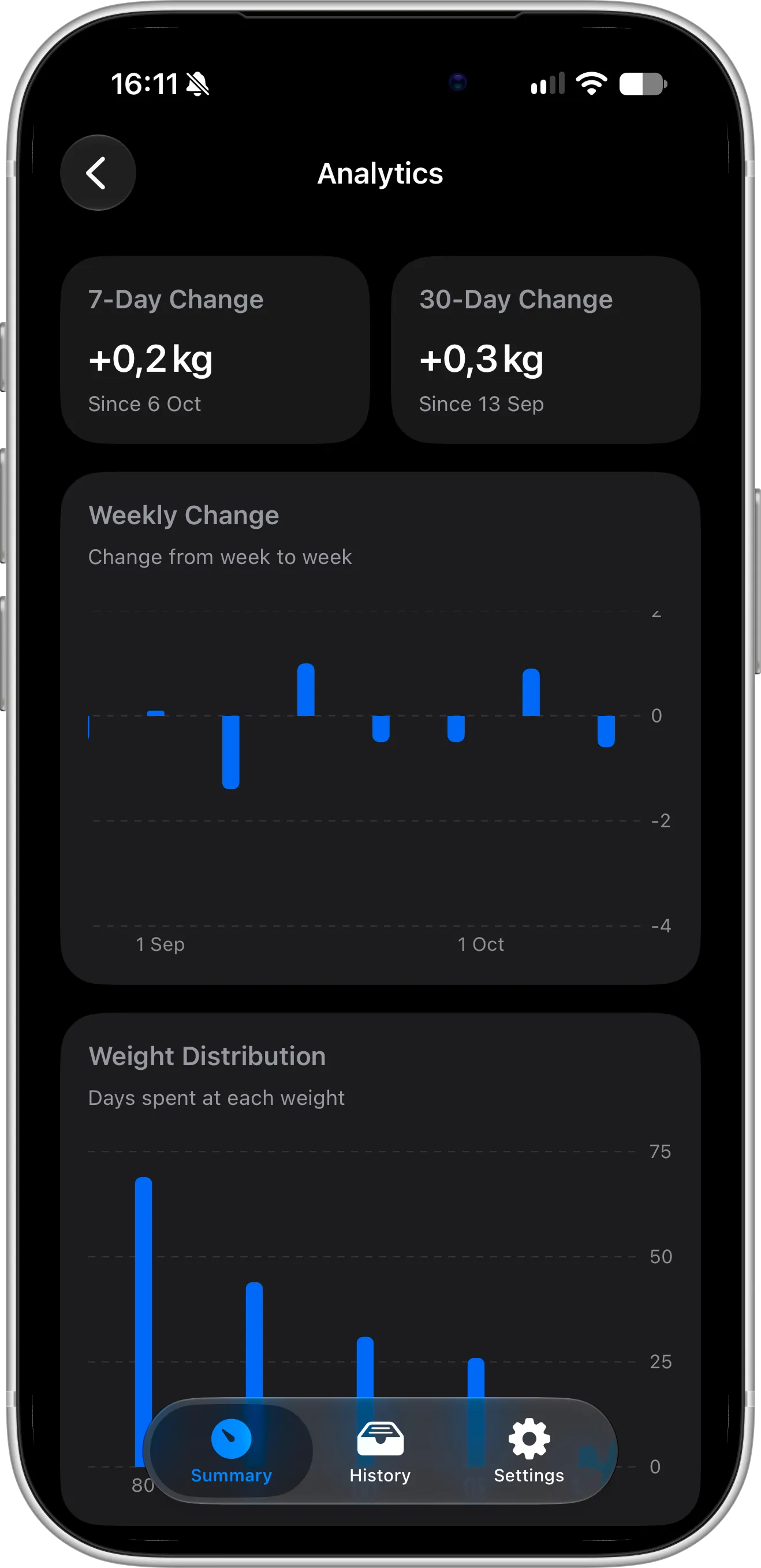
Happy Scale has plenty of charts, but they mostly show your weight and trend line over time. Scaler Pro’s analytics screen adds charts that answer different questions about your weight journey — charts you won’t find in Happy Scale.
It starts with your 7-day and 30-day weight change and a weekly change chart: a bar for each week showing how much your weight went up or down. You can instantly spot your best weeks and the ones that set you back — for example, noticing that your weight drifts up after weekends.
Understand your weight and weigh-in habits
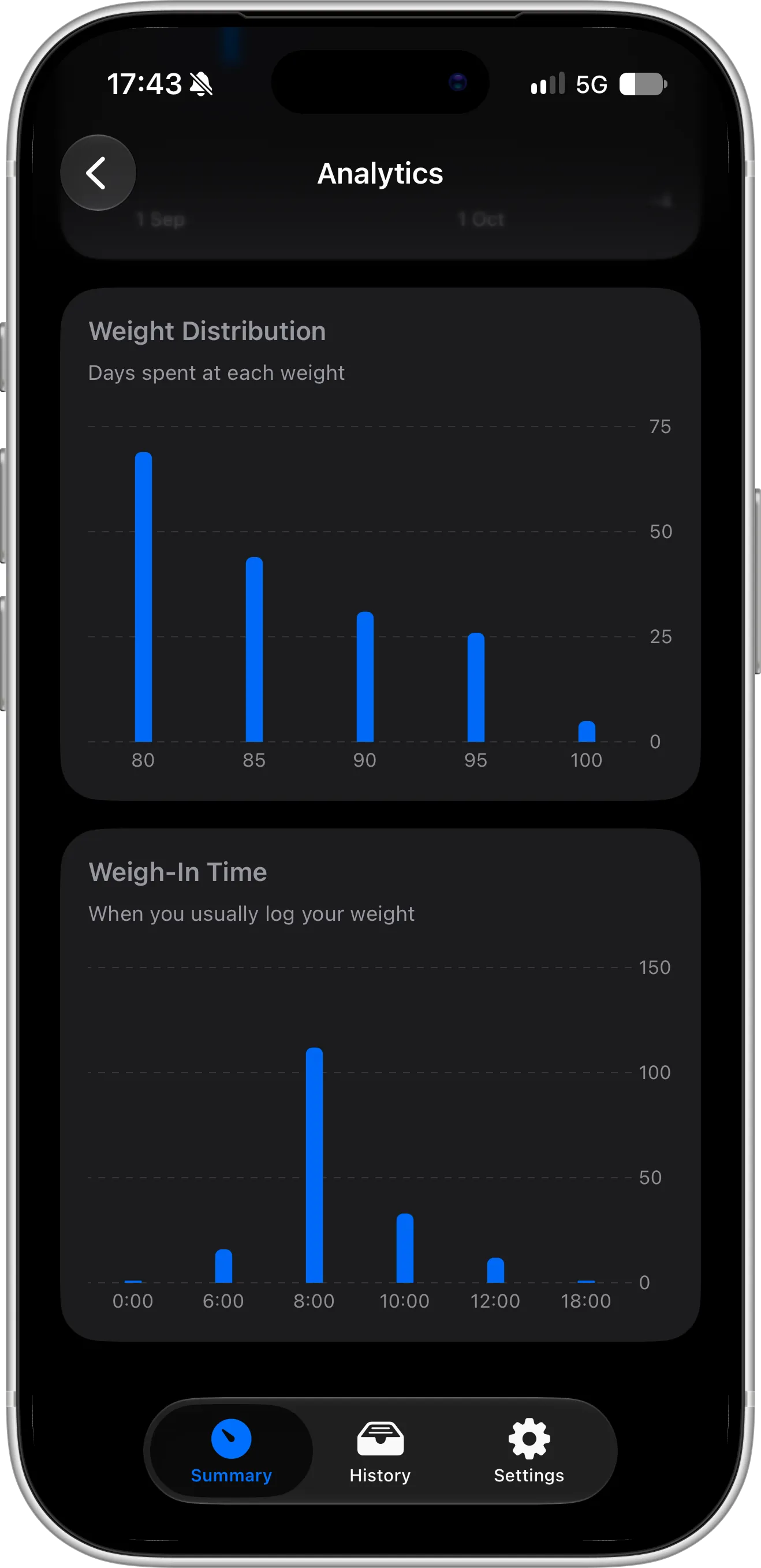
Two more Pro charts show patterns that a simple weight graph can’t:
- Weight distribution shows how many days you have spent at each weight. It reveals where your weight actually settles, which is often more honest than any single weigh-in.
- Weigh-in time distribution shows when you usually step on the scale. Weighing in at the same time each day makes your numbers far more comparable, and this chart shows how consistent you really are — and why your later weigh-ins might always read higher.
Export your data, always free
In Scaler, exporting your data is always free — no Pro upgrade, no limits and no partial exports. From Settings, you can export your full weight history as a JSON file that includes everything Scaler stores on your device.
Because JSON is an open, structured format, you can bring your data into a spreadsheet, a data analysis tool, a script of your own or another app, and analyze your progress however you like. Your data is yours, and you can take it with you whenever you want.
Where Happy Scale Is Still the Better Choice
An honest comparison has to include this part. Happy Scale may suit you better if:
- You love data and fine-tuning. Happy Scale offers many charts, statistics and settings to customize how your progress is calculated and shown. Scaler deliberately keeps things simple.
- You want to choose how your trend is calculated. Both apps calculate a trend weight that smooths out daily fluctuations. Happy Scale lets you pick between several moving-average methods and fine-tune them, while Scaler calculates your trend weight automatically, with nothing to configure.
- You like breaking a big goal into milestones. Happy Scale lets you split a large goal into smaller, incremental milestones and celebrates new lows. Scaler tracks a single goal weight.
- You track more than one person. Happy Scale supports multiple profiles on one device. Scaler is designed for one person per Apple ID.
- You want a passcode on your weight data. Happy Scale can lock your profile with a passcode.
Which Weight Tracker Should You Choose?
Stay with Happy Scale if you love detailed charts and settings, choosing your own trend method and milestones, or you share one device with someone else.
Try Scaler if you want a simple, intuitive weight tracker that makes your weight journey easy to understand at a glance, with a modern iOS 27 design, automatic iCloud sync, a free BMI calculator and a daily check-in streak to keep you weighing in.
Because both apps are free to download, the easiest way to decide is to log your weight in Scaler for a week alongside Happy Scale and keep the one you actually open.
How to Switch From Happy Scale to Scaler
There is no direct importer between the two apps, but Apple Health makes moving over simple:
- In Happy Scale, turn on Apple Health export in Settings so your weight history is saved to the Health app.
- Install Scaler from the App Store and allow Apple Health access.
- Choose your units, set your height for BMI and set your goal weight.
- Add a Home Screen widget and a Lock Screen widget to keep your progress visible.
- Turn on weigh-in reminders at the time you usually step on the scale.
FAQ
Is there a free alternative to Happy Scale?
Yes. Scaler is free to download on the App Store and includes weight tracking, goals, BMI, progress charts, reminders, Lock Screen widgets, a Home Screen widget, iCloud sync and JSON export — with no ads and no account. An optional Pro upgrade — $1.99 per month, $11.99 per year or a one-time $39.99 Lifetime purchase in the US — unlocks weight prediction, advanced analytics and two more Home Screen widget designs.
How much does Happy Scale cost?
Happy Scale is free to download. Happy Scale Deluxe costs $1.99 per month or $11.99 per year, and a lifetime unlock is $39.99 on the US App Store. The BMI calculator is part of the Deluxe+ plan. Prices vary by region.
Does Happy Scale sync with iCloud?
Happy Scale syncs between iPhone and iPad using Dropbox, and its data can be moved to a new device with a full iCloud device backup. Scaler syncs your weight entries automatically between iPhone and iPad through iCloud and backs them up, for all users.
Does Scaler show a trend weight like Happy Scale?
Yes. Scaler uses its own algorithm to calculate your trend weight, which smooths out day-to-day fluctuations like water weight, and shows it right at the top of the main screen. The difference is that Happy Scale lets you choose between several moving-average methods, while Scaler calculates the trend automatically.
Can I import my Happy Scale data into Scaler?
Not directly. Turn on Apple Health export in Happy Scale, then allow Apple Health access in Scaler.
Does Scaler work for gaining weight?
Yes. When you set your goal, you can choose to lose or gain weight, and your progress is tracked toward that target.
Is Scaler available on iPad or Android?
Scaler is available on iPhone and iPad, with your weight entries synced between them through iCloud. It isn’t available on Android.
Conclusion
Happy Scale is an excellent weight tracker, and if its trend line keeps you motivated there is no reason to switch. But if you want automatic iCloud sync without Dropbox, a free BMI calculator and a daily check-in streak, Scaler is a strong Happy Scale alternative for iPhone, and it is free to try.